

GoAccessのインストール
(1)GoAccessのインストール
Bash
[root@almalinux ~]# dnf install goaccess -y
メタデータの期限切れの最終確認: 2:52:52 前の 2026年05月26日 13時43分24秒 に実施しました。
依存関係が解決しました。
===============================================================================================================
 パッケージ                アーキテクチャー        バージョン                      リポジトリー          サイズ
===============================================================================================================
インストール:
 goaccess                  x86_64                  1.10.2-2.el9                    epel                  681 k

トランザクションの概要
===============================================================================================================
インストール  1 パッケージ

ダウンロードサイズの合計: 681 k
インストール後のサイズ: 2.7 M
パッケージのダウンロード:
goaccess-1.10.2-2.el9.x86_64.rpm                                               5.1 MB/s | 681 kB     00:00
---------------------------------------------------------------------------------------------------------------
合計                                                                           1.6 MB/s | 681 kB     00:00
トランザクションを確認しています
トランザクションの確認に成功しました。
トランザクションをテストしています
トランザクションのテストに成功しました。
トランザクションを実行しています
  準備中           :                                                                                       1/1
  インストール中   : goaccess-1.10.2-2.el9.x86_64                                                          1/1
  scriptletの実行中: goaccess-1.10.2-2.el9.x86_64                                                          1/1
  検証中           : goaccess-1.10.2-2.el9.x86_64                                                          1/1

インストール済み:
  goaccess-1.10.2-2.el9.x86_64

完了しました!(2)日本語環境の確認
Bash
[root@almalinux ~]# localectl status ※ 念のために、サーバーロケール確認
System Locale: LANG=ja_JP.utf8 ← ja_JP.utf8になっていればOK
    VC Keymap: jp
X11 Layout: jp設定ファイルの編集 (Apache用)
Bash
[root@almalinux ~]# vi /etc/goaccess/goaccess.conf

# The following time format works with any of the
# Apache/NGINX's log formats below.
#
time-format %H:%M:%S ※ コメントアウト解除

# The following date format works with any of the
# Apache/NGINX's log formats below.
#
date-format %d/%b/%Y ※ コメントアウト解除

# In addition to specifying the raw log/date/time formats, for
# simplicity, any of the following predefined log format names can be
# supplied to the log/date/time-format variables. GoAccess  can  also
# handle  one  predefined name in one variable and another predefined
# name in another variable.
#
log-format COMBINED ※ コメントアウト解除リアルタイム解析の確認
Bash
[root@almalinux ~]# goaccess /var/log/httpd/access_log
※ 画面にグラフィック化された解析結果が表示される
 ダッシュボード - 解析済みリクエスト全体 (26/ 5月/2026 - 26/ 5月/2026)[表示中のパネル: ユーザー数]

  合計リクエスト数         1 ユニークユーザー数          0  要求されたファイル数           1 リファラ数
  有効リクエスト数         1 ログの解析時間              1s 静的ファイル数                 0 ログファイルサイズ  無効リクエスト数         0 除外対象数                  0  404エラー数                    0 データ転送量
  ログ取得元               /var/log/httpd/access_log

 > 1 - 一日あたりのユニークユーザー数(クローラも含める)                                         合計: 1/1

 [ヒット数:LINEAR:REV]
          1
    1 +
      |
      |
      |
      |
    0 + -----------------------------------------------------------------------------------------------------

 ヒット数         ヒット率(%)     ユーザー数          訪問率(%)    データ転送量           tx% データ
 ------------ ----------------    --------------- ---------------- ----------------   ------- ----
            1             100.00%               0            0.00%            0.0   B   0.00% 26/ 5月/2026

[?] ヘルプ [Enter] 詳細表示 0/r - 26/ 5月/2026:16:49:57 [q] GoAccessを閉じる 1.10.矢印キーでスクロールでき、Enter キーで詳細を展開できる。
終了するときは q を押す。
HTMLレポートの作成
Bash
[root@almalinux ~]# goaccess /var/log/httpd/access_log -o /var/www/html/report.html

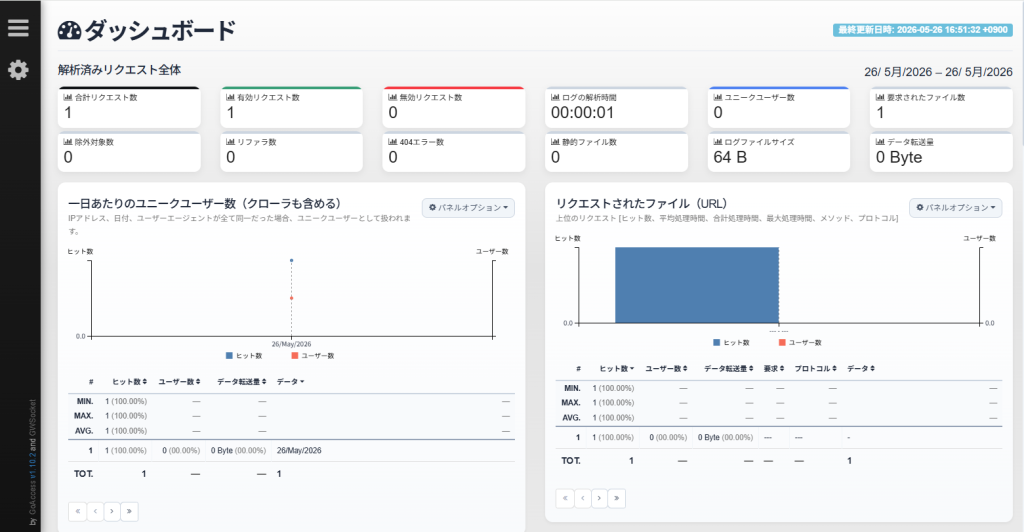
Cleaning up resources...ブラウザから http://[サーバーIP]/report.html にアクセスすると解析結果が表示される。
外部からのアクセスが無いので参考にならないが、こんな感じで見れます。
自動化設定
(1)更新用スクリプトの作成
grep時に、下記不要ログを除外するように設定する。
| 除外コード(Grep) | 対象の通信・ファイル | 除外する理由(ノイズの正体) | 除外した後の効果 |
/wp-admin/ | WordPress管理画面 | 記事編集時に裏で10〜15秒おきに自動保存などの通信(Heartbeat API)が走り、アクセス数1位になってしまうため。 | 管理画面への無駄なリクエストが消え、読まれた記事のランキングが正しく機能する。 |
/wp-login\.php | ログイン画面 | 海外のBotなどが、管理者パスワードを総当たりで狙う「不正ログイン試行」のログを排除するため。 | 攻撃Botの不快な足跡が消え、ダッシュボードのセキュリティ健全性が増す。 |
240d:f:660: | 管理者自身のIPアドレス | 自分自身がブログのデザイン確認、記事の執筆・プレビュー表示をした際のアクセスログ。 | 一般読者だけの**「純粋なPV(ページビュー)」**が正確に計測できるようになる。 |
[0-9a-f]{32}\.txt | Cloudflare生存確認 | Cloudflare Tunnelが「サーバーが生きてるか」を確かめるため、わざと存在しないランダムな .txt を要求するため。 | GoAccessの**「404エラーパネル」**を埋め尽くしていた不気味な英数字ログが全消えする。 |
/wp-cron\.php | WordPress疑似Cron | 予約投稿などの自動タスクを実行するため、WordPress自身が内部で自分を呼び出しているシステムログ。 | システム内部の自己完結タスクが消え、統計データが「100%外部からのアクセス」に研ぎ澄まされる。 |
Bash
[root@almalinux ~]# vi /root/update_report.sh ← 更新用スクリプト作成
#!/bin/bash
export LANG="ja_JP.UTF-8"

# 5大ノイズをパイプで一括シュレッダーにかけてからGoAccessに渡す
/usr/bin/grep -v -E '/wp-admin/|/wp-login\.php|240d:f:660:|[0-9a-f]{32}\.txt|/wp-cron\.php' /var/log/httpd/access_log | /usr/bin/goaccess - -o /var/www/html/report.html --log-format=COMBINED

[root@almalinux ~]# chmod +x /root/update_report.sh ← 実行権限を付与(2)Cronへの登録
1時間ごとに集計するように設定。
Bash
[root@almalinux ~]# crontab -e
0 * * * * /root/update_report.sh > /dev/null 2>&1(3)ログローテート設定の最適化
Bash
[root@almalinux ~]# vi /etc/logrotate.d/httpd
/var/log/httpd/*log {
    daily               # 毎日ローテーション
    rotate 30           # 30日分保存
    missingok           # ファイルがなくてもエラーにしない
    notifempty          # 空なら処理しない
    compress            # 圧縮して容量節約
    delaycompress       # 圧縮を1日遅らせる(書き込みエラー防止)
    sharedscripts
    postrotate
        /bin/systemctl reload httpd.service > /dev/null 2>/dev/null || true
    endscript
}

[root@almalinux ~]# logrotate -d /etc/logrotate.d/httpd ← エラーが無い事を確認
WARNING: logrotate in debug mode does nothing except printing debug messages!  Consider using verbose mode (-v) instead if this is not what you want.

reading config file /etc/logrotate.d/httpd
error: /etc/logrotate.d/httpd:5 bad rotation count '30           # 30日分保存'
error: found error in /var/log/httpd/*log , skipping
Reading state from file: /var/lib/logrotate/logrotate.status
Allocating hash table for state file, size 64 entries

Handling 1 logs

rotating pattern: /var/log/httpd/*log  after 1 days (30 rotations)
empty log files are rotated, old logs are removed
considering log /var/log/httpd/access_log
Creating new state
  Now: 2026-05-26 17:02
  Last rotated at 2026-05-26 17:00
  log does not need rotating (log has already been rotated)
considering log /var/log/httpd/error_log
Creating new state
  Now: 2026-05-26 17:02
  Last rotated at 2026-05-26 17:00
  log does not need rotating (log has already been rotated)



コメント