
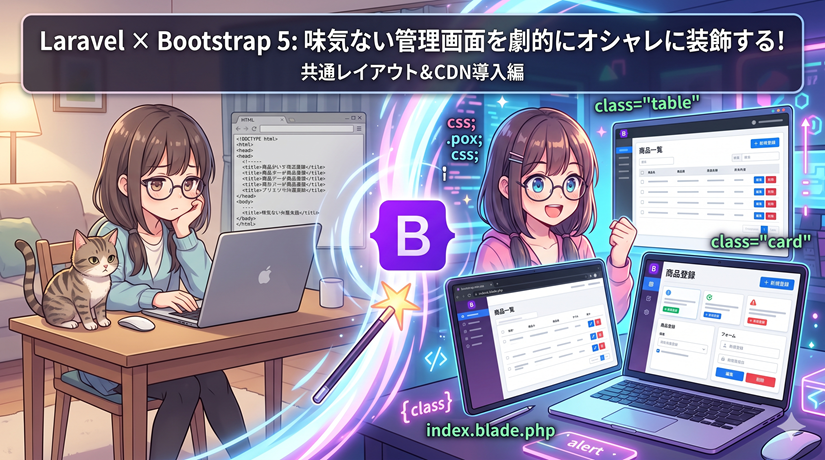
初期の未装飾なHTML状態から、Bootstrap 5(CDN)を導入して管理画面(CRUD)のUIをモダンに刷新する。 同時に、Bladeの継承機能(@extends)を用いて、ヘッダーやログアウト機能、メッセージ表示などの共通コンポーネントを共通レイアウトファイルへ分離・集約する。
🛠️ 実装の設計方針とコードの連動構造
いきなり全体のコードを追う前に、今回導入する「共通レイアウト」と「各画面」がどのようにデータをやり取りし、連動しているのかの構造を整理する。
 ┌──────────────────────────────────────┐
 │ [共通レイアウト]  layouts/app.blade.php                                    │
 │                                                                            │
 │  📁 <head> (Bootstrap 5 CSSをCDNで一括読み込み)                            │
 │  📱 navbar (共通ヘッダー:ログイン名 & ログアウトボタン)                  │
 │  🔔 alert  (保存・削除時の成功メッセージ表示エリア)                        │
 │                                                                            │
 │                ┌───────────────────┐                  │
 │                │  @yield('content')                   │ 💻はめ込み       │
 └────────┼───────────────────┼─────────┘
                   ▲                                      ▲
 ┌────────┴────────┐  ┌────────┴────────┐
 │ products/index                   │  │ products/create                  │
 │ (一覧のテーブル)                 │  │ (登録のフォーム)                 │
 └─────────────────┘  └─────────────────┘
1. 共通化のキーとなるBlade構文
@yield('パーツ名', 'デフォルト値'):共通側に記述する。「ここに各画面固有の中身を流し込む」ための空き部屋(プレースホルダー)。@extends('レイアウト名'):子画面側に記述する。「この画面は指定した共通の枠組み(外枠)を使います」という宣言。@section('パーツ名')〜@endsection:子画面側に記述する。共通側の@yieldで指定した空き部屋に、具体的なHTML(テーブルやフォーム)を流し込む。
2. UIを整えるBootstrap 5の主要クラス
container:左右に程よい余白を持たせ、コンテンツを中央寄せにする。card shadow-sm border-0:うっすらと影のついた、境界線のない白い立体的なボックスを作る。フォームやテーブルの土台に最適。table table-hover align-middle:セルの余白を整え、行の縦中央揃えを行い、さらにマウスホバーで背景色が変わるモダンな表にする。form-control/form-select:入力ボックスやセレクトボックスを横幅いっぱいに広げ、フォーカス時に綺麗な青い枠線が出るようにする。
ステップ 1:共通レイアウト(外枠)の作成
resources/views/layouts/app.blade.php を新規作成する。 全画面で共通して使う「Bootstrapの読み込み」「黒いヘッダー(ログアウトボタン内蔵)」「成功メッセージの通知枠」をここに集約する。
<!DOCTYPE html>
<html lang="ja">
<head>
    <meta charset="UTF-8">
    <meta name="viewport" content="width=device-width, initial-scale=1.0">
    <!-- 各子画面の @section('title') で指定された文字列がここに入ります -->
    <title>@yield('title', '商品管理システム')</title>

    <!-- 🌟 Bootstrap 5 CDN (CSS) をネット経由で一括読み込み -->
    <link href="https://cdn.jsdelivr.net/npm/[email protected]/dist/css/bootstrap.min.css" rel="stylesheet">
</head>
<body class="bg-light"> <!-- bg-lightで画面全体を少しグレーにして白カードを引き立たせる -->

    <!-- 📱 共通ナビゲーションバー(ヘッダー) -->
    <nav class="navbar navbar-expand-lg navbar-dark bg-dark mb-4 shadow-sm">
        <div class="container">
            <a class="navbar-brand fw-bold" href="{{ route('products.index') }}">📦 商品管理システム</a>

            <!-- 認証状態チェック:ログイン時のみ右側にユーザー名とログアウトボタンを表示 -->
            @auth
            <div class="navbar-nav ms-auto align-items-center text-white">
                <span class="me-3 small">👤 {{ Auth::user()->name }} さん</span>
                <!-- ログアウトはセキュリティ(不正ログアウト防止)のためPOSTフォームで実行 -->
                <form action="{{ route('logout') }}" method="POST" class="d-inline">
                    @csrf
                    <button type="submit" class="btn btn-sm btn-outline-light">ログアウト</button>
                </form>
            </div>
            @endauth
        </div>
    </nav>

    <!-- 🔔 メインコンテンツ挿入領域 -->
    <main class="container">
        <!-- セッションにsuccess(登録・削除完了などのメッセージ)があれば自動で共通表示 -->
        @if (session('success'))
            <div class="alert alert-success alert-dismissible fade show shadow-sm" role="alert">
                {{ session('success') }}
                <!-- 閉じるボタン(JavaScriptで動作) -->
                <button type="button" class="btn-close" data-bs-dismiss="alert" aria-label="Close"></button>
            </div>
        @endif

        <!-- 🌟 ここに各子画面の @section('content') の中身がガチャンとはめ込まれます -->
        @yield('content')
    </main>

    <!-- 🌟 Bootstrap 5 の動的コンポーネント(アラートの閉じるボタンなど)を動かすための JavaScript -->
    <script src="https://cdn.jsdelivr.net/npm/[email protected]/dist/js/bootstrap.bundle.min.js"></script>
</body>
</html>
ステップ 2:商品一覧画面(index)の書き換え
resources/views/products/index.blade.php の中身を全面刷新する。 無骨なHTMLの表を、Bootstrapのテーブルコンポーネントとカードを使って装飾する。
<!-- 先ほど作った「layouts/app.blade.php」を共通の外枠として使うことを宣言 -->
@extends('layouts.app')

<!-- 共通枠の @yield('title') に「商品一覧」という文字を送る -->
@section('title', '商品一覧')

<!-- 共通枠の @yield('content') の空き部屋に、以下の中身をすべて流し込む -->
@section('content')
<div class="d-flex justify-content-between align-items-center mb-4">
    <h2 class="fw-bold m-0 text-secondary">商品一覧</h2>
    <!-- btn btn-primary でカチッとした綺麗な青いボタンに変身 -->
    <a href="{{ route('products.create') }}" class="btn btn-primary shadow-sm">➕ 新規登録</a>
</div>

<!-- cardクラスで立体的な白い外枠を作り、その中にテーブルを配置する -->
<div class="card shadow-sm border-0">
    <div class="card-body p-0">
        <div class="table-responsive">
            <!-- table-hover: マウスを乗せた行が薄いグレーになるエフェクト -->
            <table class="table table-hover align-middle m-0">
                <thead class="table-dark"> <!-- ヘッダー行を黒にして引き締める -->
                    <tr>
                        <th class="ps-3" style="width: 80px;">ID</th>
                        <th>商品名</th>
                        <th>カテゴリ</th>
                        <th>価格</th>
                        <th class="pe-3 text-center" style="width: 160px;">操作</th>
                    </tr>
                </thead>
                <tbody>
                    @forelse ($products as $product)
                        <tr>
                            <td class="ps-3 text-muted fw-bold">{{ $product->id }}</td>
                            <td class="fw-bold text-dark">{{ $product->name }}</td>
                            <td>
                                <!-- badgeクラスでカテゴリ名をラベル風(丸角タブ風)に装飾 -->
                                <span class="badge bg-secondary px-2 py-1">
                                    {{ $product->category?->name ?? '未分類' }}
                                </span>
                            </td>
                            <td class="text-success fw-bold">¥{{ number_format($product->price) }}</td>
                            <td class="pe-3 text-center">
                                <!-- btn-group で編集と削除のボタンを隙間なく1つの塊に結合 -->
                                <div class="btn-group btn-group-sm" role="group">
                                    <a href="{{ route('products.edit', $product->id) }}" class="btn btn-outline-primary">編集</a>

                                    <!-- 削除用フォーム(JavaScript確認ダイアログに動的な商品名「{{ $product->name }}」を埋め込み) -->
                                    <form action="{{ route('products.destroy', $product->id) }}" method="POST" onsubmit="return confirm('「{{ $product->name }}」を削除してもよろしいですか?');" class="d-inline">
                                        @csrf
                                        @method('DELETE')
                                        <button type="submit" class="btn btn-outline-danger">削除</button>
                                    </form>
                                </div>
                            </td>
                        </tr>
                    @empty
                        <tr>
                            <td colspan="5" class="text-center text-muted py-4">登録されている商品はありません。</td>
                        </tr>
                    @endforelse
                </tbody>
            </table>
        </div>
    </div>
</div>
@endsectionステップ 3:商品登録・編集画面(create / edit)の書き換え
入力フォーム周りは画面中央にすっきり収まるよう横幅を制限(col-md-8)し、カードフォームの中にBootstrapの各種パーツを適応させる。
商品登録画面(resources/views/products/create.blade.php)
@extends('layouts.app')

@section('title', '商品登録')

@section('content')
<div class="row justify-content-center"> <!-- フォームを画面のパーツ中央に寄せる -->
    <div class="col-md-8">
        <div class="d-flex align-items-center mb-3">
            <a href="{{ route('products.index') }}" class="btn btn-sm btn-outline-secondary me-3">⬅ 一覧へ戻る</a>
            <h3 class="fw-bold m-0 text-secondary">商品新規登録</h3>
        </div>

        <!-- バリデーションエラーが起きた場合の警告ボックス -->
        @if ($errors->any())
            <div class="alert alert-danger shadow-sm">
                <ul class="mb-0">
                    @foreach ($errors->all() as $error)
                        <li>{{ $error }}</li>
                    @endforeach
                </ul>
            </div>
        @endif

        <!-- カード型の入力フォームコンテナ -->
        <div class="card shadow-sm border-0">
            <div class="card-body p-4">
                <form action="{{ route('products.store') }}" method="POST">
                    @csrf

                    <div class="mb-3">
                        <label for="category_id" class="form-label fw-bold small">カテゴリ</label>
                        <!-- form-select: Bootstrap標準の綺麗なドロップダウンメニュー -->
                        <select name="category_id" id="category_id" class="form-select">
                            <option value="">-- カテゴリを選択してください --</option>
                            @foreach ($categories as $category)
                                <option value="{{ $category->id }}" {{ old('category_id') == $category->id ? 'selected' : '' }}>
                                    [{{ $category->major_category_name }}] {{ $category->name }}
                                </option>
                            @endforeach
                        </select>
                    </div>

                    <div class="mb-3">
                        <label for="name" class="form-label fw-bold small">商品名</label>
                        <!-- form-control: フォーカス時にうっすら青く光るスタイリッシュな入力欄 -->
                        <input type="text" name="name" id="name" class="form-control" value="{{ old('name') }}" placeholder="例: プレミアムコーヒー豆">
                    </div>

                    <div class="mb-3">
                        <label for="price" class="form-label fw-bold small">価格(円)</label>
                        <!-- input-group: 頭に「¥」などの単位マークを合体させるフォームパーツ -->
                        <div class="input-group">
                            <span class="input-group-text">¥</span>
                            <input type="number" name="price" id="price" class="form-control" value="{{ old('price') }}" placeholder="1500">
                        </div>
                    </div>

                    <div class="mb-4">
                        <label for="description" class="form-label fw-bold small">商品説明文</label>
                        <textarea name="description" id="description" class="form-control" rows="4" placeholder="商品の詳細な説明を入力してください">{{ old('description') }}</textarea>
                    </div>

                    <!-- d-grid: 横幅いっぱいに広がる押しやすい大型ボタンを設置 -->
                    <div class="d-grid">
                        <button type="submit" class="btn btn-primary btn-lg shadow-sm fw-bold">商品を登録する</button>
                    </div>
                </form>
            </div>
        </div>
    </div>
</div>
@endsection商品編集画面(resources/views/products/edit.blade.php)
基本構造は登録画面と同じ。送信メソッドの疑似指定(@method('PUT'))と、既存データの初期値読み込み(old('name', $product->name))を行う。
@extends('layouts.app')

@section('title', '商品編集')

@section('content')
<div class="row justify-content-center">
    <div class="col-md-8">
        <div class="d-flex align-items-center mb-3">
            <a href="{{ route('products.index') }}" class="btn btn-sm btn-outline-secondary me-3">⬅ キャンセル</a>
            <h3 class="fw-bold m-0 text-secondary">商品情報編集</h3>
        </div>

        @if ($errors->any())
            <div class="alert alert-danger shadow-sm">
                <ul class="mb-0">
                    @foreach ($errors->all() as $error)
                        <li>{{ $error }}</li>
                    @endforeach
                </ul>
            </div>
        @endif

        <div class="card shadow-sm border-0">
            <div class="card-body p-4">
                <form action="{{ route('products.update', $product->id) }}" method="POST">
                    @csrf
                    @method('PUT') <!-- HTMLフォームでPUT(更新)をシミュレート -->

                    <div class="mb-3">
                        <label for="category_id" class="form-label fw-bold small">カテゴリ</label>
                        <select name="category_id" id="category_id" class="form-select">
                            @foreach ($categories as $category)
                                <option value="{{ $category->id }}" {{ old('category_id', $product->category_id) == $category->id ? 'selected' : '' }}>
                                    [{{ $category->major_category_name }}] {{ $category->name }}
                                </option>
                            @endforeach
                        </select>
                    </div>

                    <div class="mb-3">
                        <label for="name" class="form-label fw-bold small">商品名</label>
                        <input type="text" name="name" id="name" class="form-control" value="{{ old('name', $product->name) }}">
                    </div>

                    <div class="mb-3">
                        <label for="price" class="form-label fw-bold small">価格(円)</label>
                        <div class="input-group">
                            <span class="input-group-text">¥</span>
                            <input type="number" name="price" id="price" class="form-control" value="{{ old('price', $product->price) }}">
                        </div>
                    </div>

                    <div class="mb-4">
                        <label for="description" class="form-label fw-bold small">商品説明文</label>
                        <textarea name="description" id="description" class="form-control" rows="4">{{ old('description', $product->description) }}</textarea>
                    </div>

                    <!-- 更新用は目立たせるためにボタンの色を緑色(btn-success)に指定 -->
                    <div class="d-grid">
                        <button type="submit" class="btn btn-success btn-lg shadow-sm fw-bold">変更を保存する</button>
                    </div>
                </form>
            </div>
        </div>
    </div>
</div>
@endsection📌 導入後の動作確認・検証のチェックポイント
すべてのファイルを配置したあと、ブラウザで /products(一覧画面)にアクセスし、以下の挙動が正常に動作しているか確認する。
1.レイアウトが共通化されているか
一覧・登録・編集のどの画面を開いても、上部の「黒いナビゲーションバー(ヘッダー)」が共通して崩れずに固定表示されているか。
右上に現在ログインしているユーザー名が正しく出力されているか。



2.Bootstrapの各クラスが機能しているか
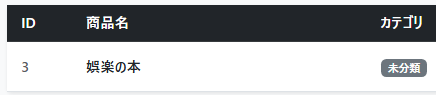
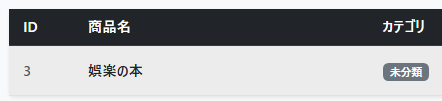
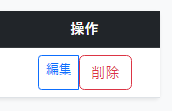
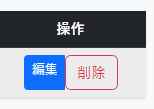
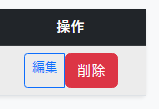
テーブルの行にマウスを当てた際、背景色が薄いグレーに反応するか(table-hoverの検証)。
入力フォームを1クリックした際、枠線が綺麗な青色に変化するか(form-controlの検証)。
3.通知メッセージとJavaScriptが連動しているか
商品を追加・変更・削除した際、一覧画面の上部に緑色の通知アラート(alert-success)が表示され、その右端の「×」を押すと、JavaScriptによってパッと消えるか。

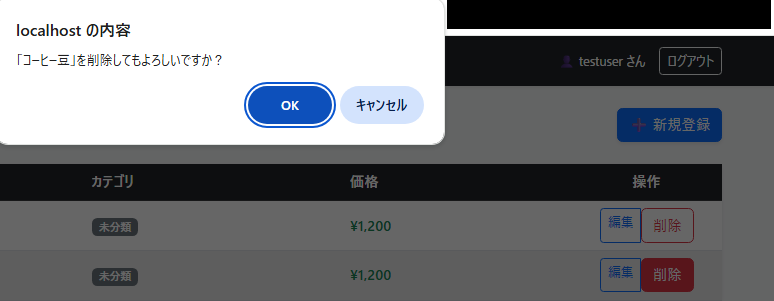
削除ボタンを押した際、「〇〇(その行の商品名)を削除してもよろしいですか?」というブラウザ標準のダイアログが正しくポップアップするか。
初期の未装飾なHTML状態から、Bootstrap 5(CDN)を導入して管理画面(CRUD)のUIをモダンに刷新する。
同時に、Bladeの継承機能(@extends)を用いて、ヘッダーやログアウトボタン、メッセージ表示などの共通コンポーネントを共通レイアウトファイルへ分離・集約する。
1.実装の全体構造・設計方針
1. テンプレートの共通化(共通枠と中身の分離)
各画面(一覧・登録・編集)で重複していた <html>, <head>, 認証状態に応じた「ヘッダー(ログアウト機能)」などの記述を、1つの共通レイアウトファイルに集約する。
- 共通レイアウト(外枠):
resources/views/layouts/app.blade.phpBootstrapの読み込み、ナビゲーションバー(ログアウトボタン)、フラッシュメッセージ(成功通知)の表示エリアを定義。コンテンツ挿入位置に@yield('content')を配置。 - 各ビュー(中身): 一覧(
index)、登録(create)、編集(edit) 先頭で@extends('layouts.app')を宣言し、@section('content')〜@endsectionの中に固有のUIコード(テーブルやフォーム)のみを記述する。
2. Bootstrap 5の主要クラス適用
tabletable-hover: ホバーエフェクト付きのレスポンシブなデータテーブルcardshadow-sm: 境界線を排した立体感のあるフォーム用白背景コンテナform-controlform-select: 横幅いっぱいに広がるモダンな入力フィールドbtnbtn-primary/btn-success: 視認性の高いフラットデザインボタン
ステップ 1:共通レイアウトの作成
resources/views/layouts/app.blade.php を新規作成し、全体のベースとなる外枠を実装する。
<!DOCTYPE html>
<html lang="ja">
<head>
    <meta charset="UTF-8">
    <meta name="viewport" content="width=device-width, initial-scale=1.0">
    <title>@yield('title', '商品管理システム')</title>
    <!-- Bootstrap 5 CDN (CSS) -->
    <link href="https://cdn.jsdelivr.net/npm/[email protected]/dist/css/bootstrap.min.css" rel="stylesheet">
</head>
<body class="bg-light">

    <!-- 共通ナビゲーションバー(ヘッダー) -->
    <nav class="navbar navbar-expand-lg navbar-dark bg-dark mb-4 shadow-sm">
        <div class="container">
            <a class="navbar-brand fw-bold" href="{{ route('products.index') }}">📦 商品管理システム</a>

            <!-- 認証状態チェック:ログイン時のみ右側にユーザー名とログアウトボタンを表示 -->
            @auth
            <div class="navbar-nav ms-auto align-items-center text-white">
                <span class="me-3 small">👤 {{ Auth::user()->name }} さん</span>
                <form action="{{ route('logout') }}" method="POST" class="d-inline">
                    @csrf
                    <button type="submit" class="btn btn-sm btn-outline-light">ログアウト</button>
                </form>
            </div>
            @endauth
        </div>
    </nav>

    <!-- メインコンテンツ挿入領域 -->
    <main class="container">
        <!-- グリントメッセージ(セッション経由の成功通知)の共通表示 -->
        @if (session('success'))
            <div class="alert alert-success alert-dismissible fade show shadow-sm" role="alert">
                {{ session('success') }}
                <button type="button" class="btn-close" data-bs-dismiss="alert" aria-label="Close"></button>
            </div>
        @endif

        @yield('content')
    </main>

    <!-- Bootstrap 5 CDN (JavaScript) -->
    <script src="https://cdn.jsdelivr.net/npm/[email protected]/dist/js/bootstrap.bundle.min.js"></script>
</body>
</html>
ステップ 2:商品一覧画面(index)の書き換え
resources/views/products/index.blade.php の中身を全面刷新。テーブル、バッジ、ボタングループの装飾を適用。
@extends('layouts.app')

@section('title', '商品一覧')

@section('content')
<div class="d-flex justify-content-between align-items-center mb-4">
    <h2 class="fw-bold m-0 text-secondary">商品一覧</h2>
    <a href="{{ route('products.create') }}" class="btn btn-primary shadow-sm">➕ 新規登録</a>
</div>

<div class="card shadow-sm border-0">
    <div class="card-body p-0">
        <div class="table-responsive">
            <table class="table table-hover align-middle m-0">
                <thead class="table-dark">
                    <tr>
                        <th class="ps-3" style="width: 80px;">ID</th>
                        <th>商品名</th>
                        <th>カテゴリ</th>
                        <th>価格</th>
                        <th class="pe-3 text-center" style="width: 160px;">操作</th>
                    </tr>
                </thead>
                <tbody>
                    @forelse ($products as $product)
                        <tr>
                            <td class="ps-3 text-muted fw-bold">{{ $product->id }}</td>
                            <td class="fw-bold text-dark">{{ $product->name }}</td>
                            <td>
                                <span class="badge bg-secondary px-2 py-1">
                                    {{ $product->category?->name ?? '未分類' }}
                                </span>
                            </td>
                            <td class="text-success fw-bold">¥{{ number_format($product->price) }}</td>
                            <td class="pe-3 text-center">
                                <div class="btn-group btn-group-sm" role="group">
                                    <a href="{{ route('products.edit', $product->id) }}" class="btn btn-outline-primary">編集</a>

                                    <!-- 削除用フォーム(動的な商品名を含んだJavaScript確認アラート付き) -->
                                    <form action="{{ route('products.destroy', $product->id) }}" method="POST" onsubmit="return confirm('「{{ $product->name }}」を削除してもよろしいですか?');" class="d-inline">
                                        @csrf
                                        @method('DELETE')
                                        <button type="submit" class="btn btn-outline-danger">削除</button>
                                    </form>
                                </div>
                            </td>
                        </tr>
                    @empty
                        <tr>
                            <td colspan="5" class="text-center text-muted py-4">登録されている商品はありません。</td>
                        </tr>
                    @endforelse
                </tbody>
            </table>
        </div>
    </div>
</div>
@endsectionステップ 3:商品登録・編集画面(create / edit)の書き換え
フォームコンポーネント、バリデーションエラー表示をBootstrapスタイルに適応させる。
商品登録画面(resources/views/products/create.blade.php)
@extends('layouts.app')

@section('title', '商品登録')

@section('content')
<div class="row justify-content-center">
    <div class="col-md-8">
        <div class="d-flex align-items-center mb-3">
            <a href="{{ route('products.index') }}" class="btn btn-sm btn-outline-secondary me-3">⬅ 一覧へ戻る</a>
            <h3 class="fw-bold m-0 text-secondary">商品新規登録</h3>
        </div>

        @if ($errors->any())
            <div class="alert alert-danger shadow-sm">
                <ul class="mb-0">
                    @foreach ($errors->all() as $error)
                        <li>{{ $error }}</li>
                    @endforeach
                </ul>
            </div>
        @endif

        <div class="card shadow-sm border-0">
            <div class="card-body p-4">
                <form action="{{ route('products.store') }}" method="POST">
                    @csrf

                    <div class="mb-3">
                        <label for="category_id" class="form-label fw-bold small">カテゴリ</label>
                        <select name="category_id" id="category_id" class="form-select">
                            <option value="">-- カテゴリを選択してください --</option>
                            @foreach ($categories as $category)
                                <option value="{{ $category->id }}" {{ old('category_id') == $category->id ? 'selected' : '' }}>
                                    [{{ $category->major_category_name }}] {{ $category->name }}
                                </option>
                            @endforeach
                        </select>
                    </div>

                    <div class="mb-3">
                        <label for="name" class="form-label fw-bold small">商品名</label>
                        <input type="text" name="name" id="name" class="form-control" value="{{ old('name') }}" placeholder="例: プレミアムコーヒー豆">
                    </div>

                    <div class="mb-3">
                        <label for="price" class="form-label fw-bold small">価格(円)</label>
                        <div class="input-group">
                            <span class="input-group-text">¥</span>
                            <input type="number" name="price" id="price" class="form-control" value="{{ old('price') }}" placeholder="1500">
                        </div>
                    </div>

                    <div class="mb-4">
                        <label for="description" class="form-label fw-bold small">商品説明文</label>
                        <textarea name="description" id="description" class="form-control" rows="4" placeholder="商品の詳細な説明を入力してください">{{ old('description') }}</textarea>
                    </div>

                    <div class="d-grid">
                        <button type="submit" class="btn btn-primary btn-lg shadow-sm fw-bold">商品を登録する</button>
                    </div>
                </form>
            </div>
        </div>
    </div>
</div>
@endsection商品編集画面(resources/views/products/edit.blade.php)
@extends('layouts.app')

@section('title', '商品編集')

@section('content')
<div class="row justify-content-center">
    <div class="col-md-8">
        <div class="d-flex align-items-center mb-3">
            <a href="{{ route('products.index') }}" class="btn btn-sm btn-outline-secondary me-3">⬅ キャンセル</a>
            <h3 class="fw-bold m-0 text-secondary">商品情報編集</h3>
        </div>

        @if ($errors->any())
            <div class="alert alert-danger shadow-sm">
                <ul class="mb-0">
                    @foreach ($errors->all() as $error)
                        <li>{{ $error }}</li>
                    @endforeach
                </ul>
            </div>
        @endif

        <div class="card shadow-sm border-0">
            <div class="card-body p-4">
                <form action="{{ route('products.update', $product->id) }}" method="POST">
                    @csrf
                    @method('PUT')

                    <div class="mb-3">
                        <label for="category_id" class="form-label fw-bold small">カテゴリ</label>
                        <select name="category_id" id="category_id" class="form-select">
                            @foreach ($categories as $category)
                                <option value="{{ $category->id }}" {{ old('category_id', $product->category_id) == $category->id ? 'selected' : '' }}>
                                    [{{ $category->major_category_name }}] {{ $category->name }}
                                </option>
                            @endforeach
                        </select>
                    </div>

                    <div class="mb-3">
                        <label for="name" class="form-label fw-bold small">商品名</label>
                        <input type="text" name="name" id="name" class="form-control" value="{{ old('name', $product->name) }}">
                    </div>

                    <div class="mb-3">
                        <label for="price" class="form-label fw-bold small">価格(円)</label>
                        <div class="input-group">
                            <span class="input-group-text">¥</span>
                            <input type="number" name="price" id="price" class="form-control" value="{{ old('price', $product->price) }}">
                        </div>
                    </div>

                    <div class="mb-4">
                        <label for="description" class="form-label fw-bold small">商品説明文</label>
                        <textarea name="description" id="description" class="form-control" rows="4">{{ old('description', $product->description) }}</textarea>
                    </div>

                    <div class="d-grid">
                        <button type="submit" class="btn btn-success btn-lg shadow-sm fw-bold">変更を保存する</button>
                    </div>
                </form>
            </div>
        </div>
    </div>
</div>
@endsection
コメント